newways.suite
EN
Try for 14 days

CRM and project software

From first enquiry
to signed project.

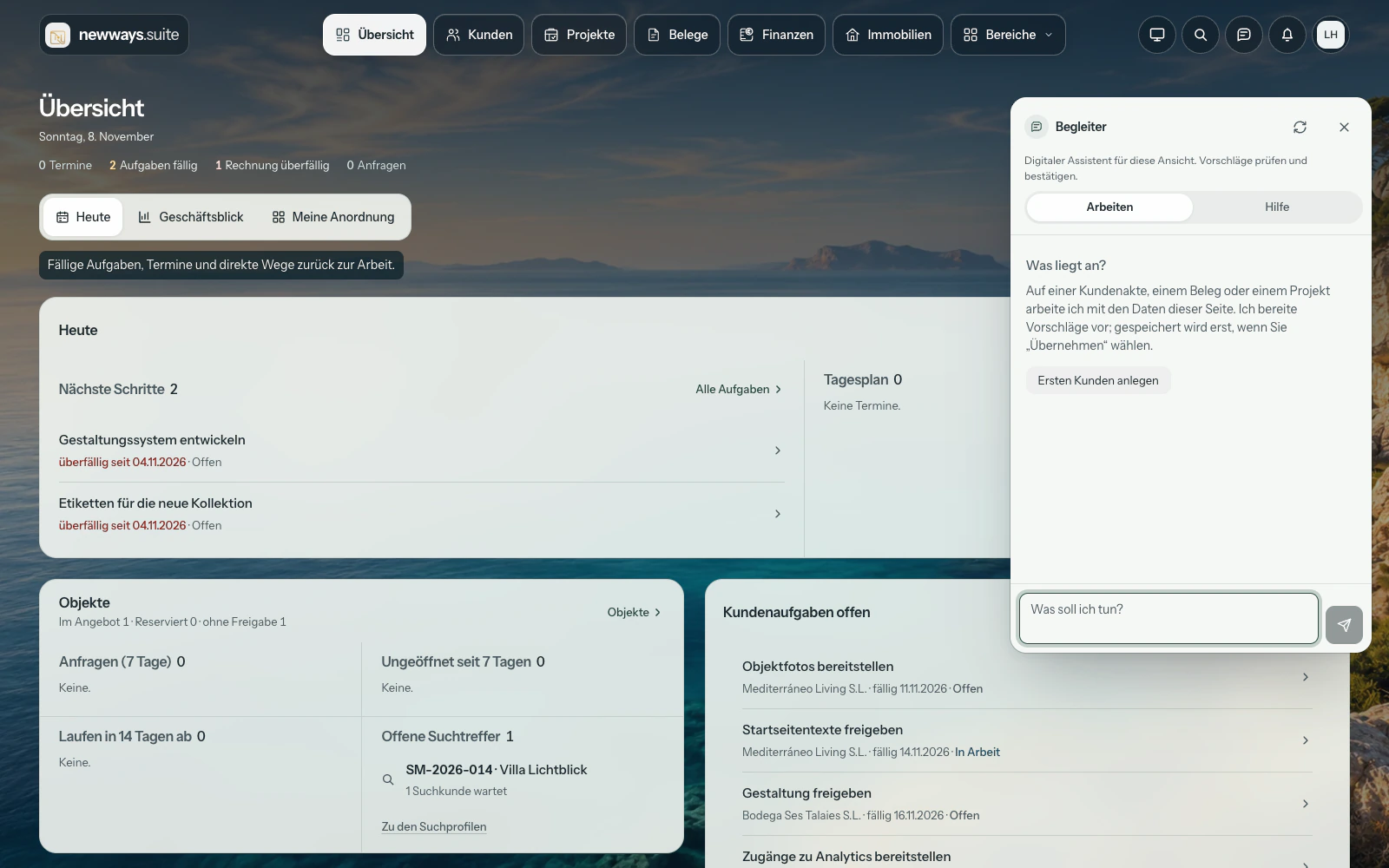
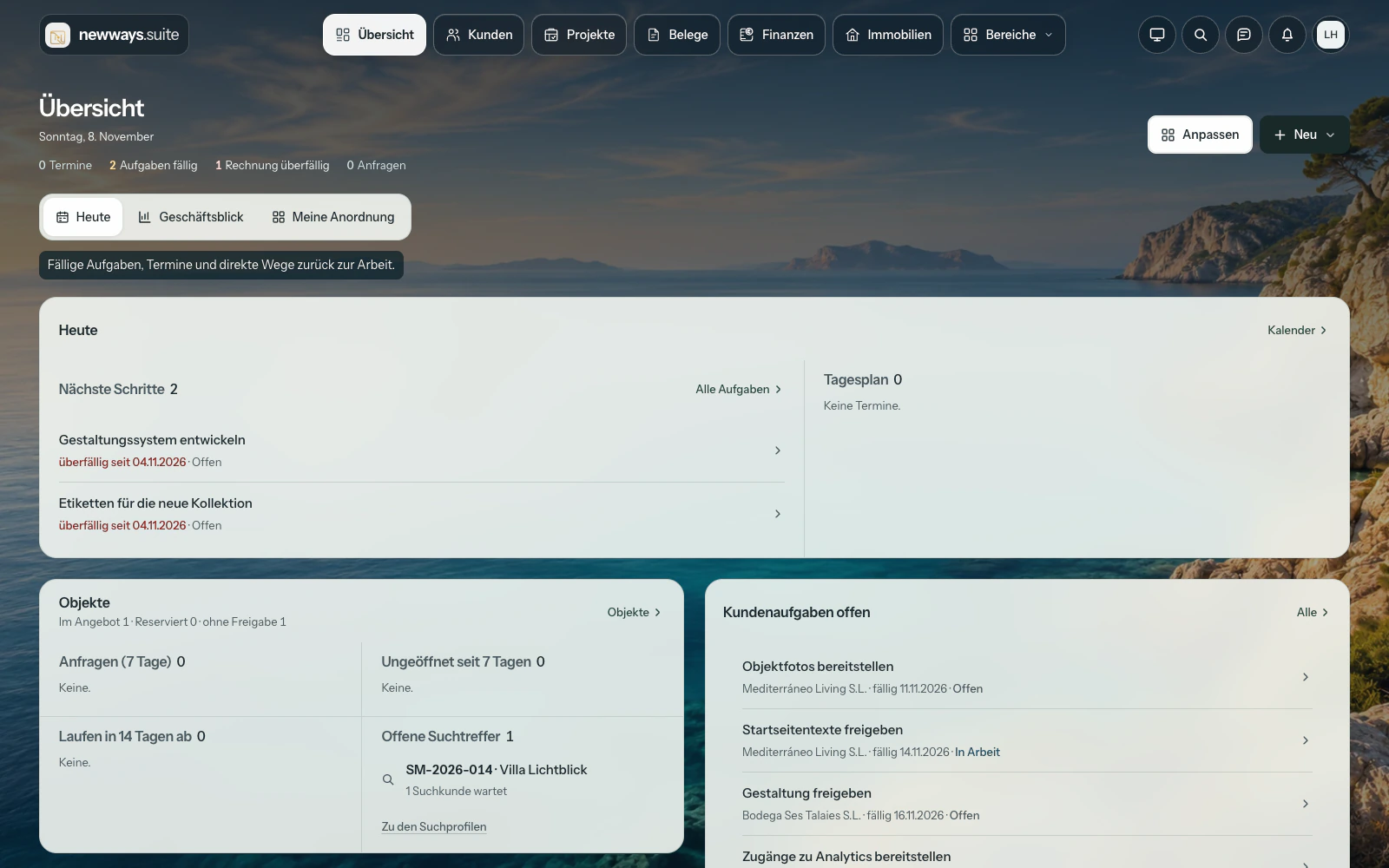
The actual Suite interface on floating glass panels above a coastal landscape.
Horizont · German interface · Sample dataOpen product view

For agencies, consultancies and service teams. Schedule the next call in the contact record, share a quote and manage the project through to the invoice.

No payment details required. The contract starts at booking; fees apply after 14 days unless you cancel.

From a sales enquiry to a project

A prospect calls about a project. Your team records the conversation, schedules a call back and shares a quote when it is ready. Everyone works from the same contact record.

Follow-up

Who is calling back on Thursday?

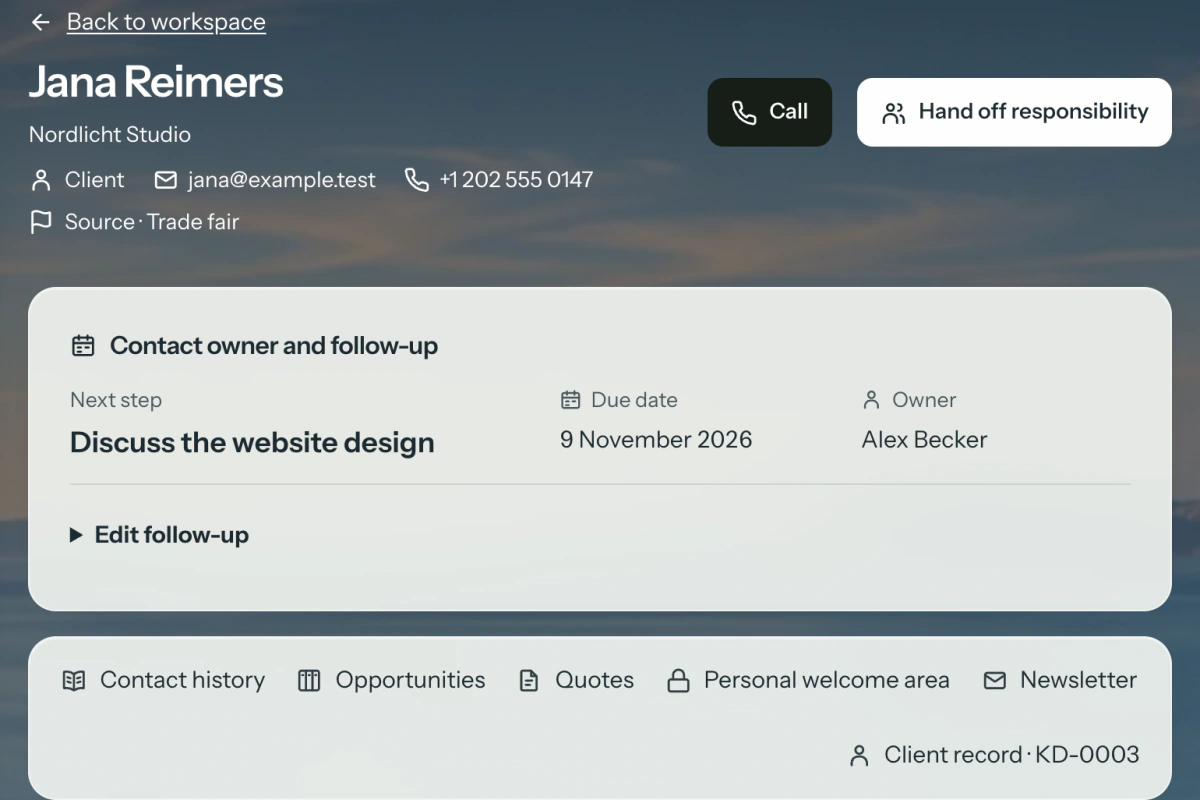
Record the conversation, an owner and a due date against the contact. The work queue shows which calls are due. When you hand a contact to a colleague, the handover stays in the history.

Import contacts from Outlook, Google Contacts or vCard. You can also import a LinkedIn connections export.

Contact record with conversation history, owner and follow-up Enlarge view
newways.suite 1.41.2 · Sample data

Sales opportunities

Which quotes need a decision?

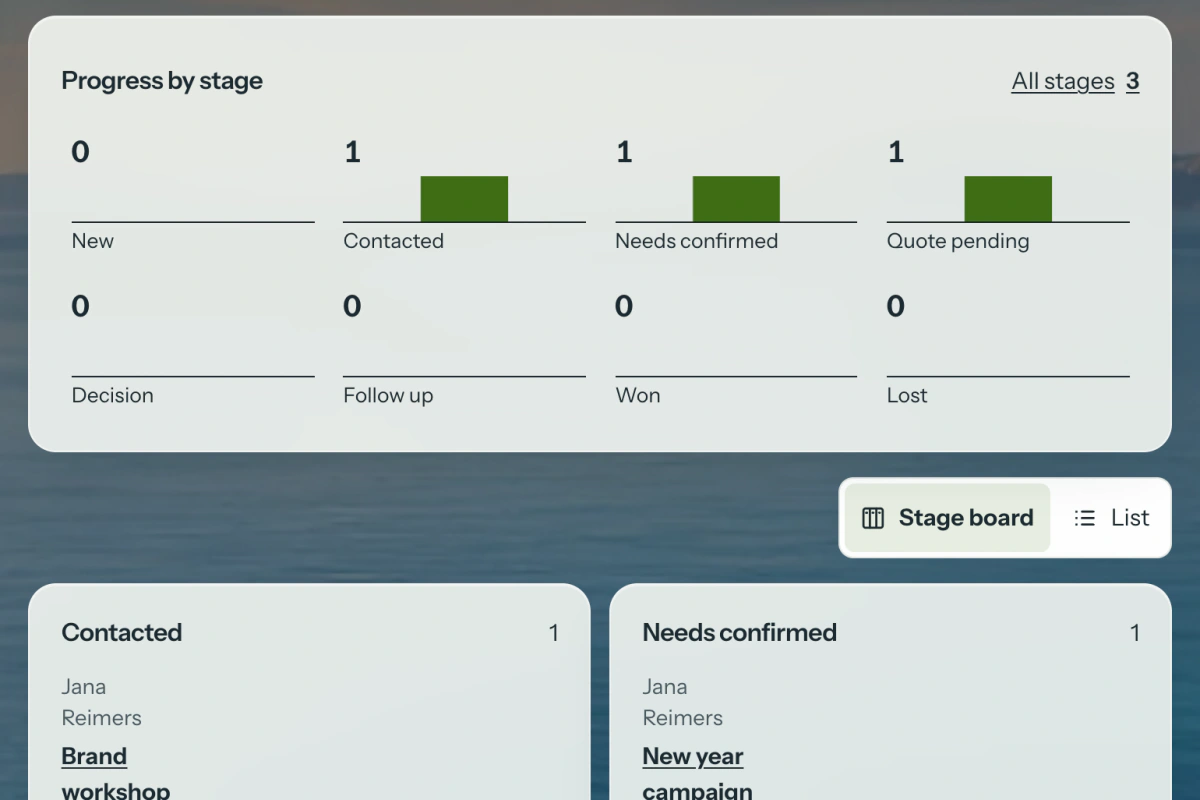
See your opportunities by stage on the sales canvas. Open a stage to inspect a particular opportunity. If the same contact asks about two projects, track them separately.

The sales report shows the current pipeline and recorded changes. You can also export the data as CSV.

Sales canvas showing opportunities by stage Enlarge view
newways.suite 1.41.2 · Sample data

Personal Welcome area

One place to review a quote and ask a question.

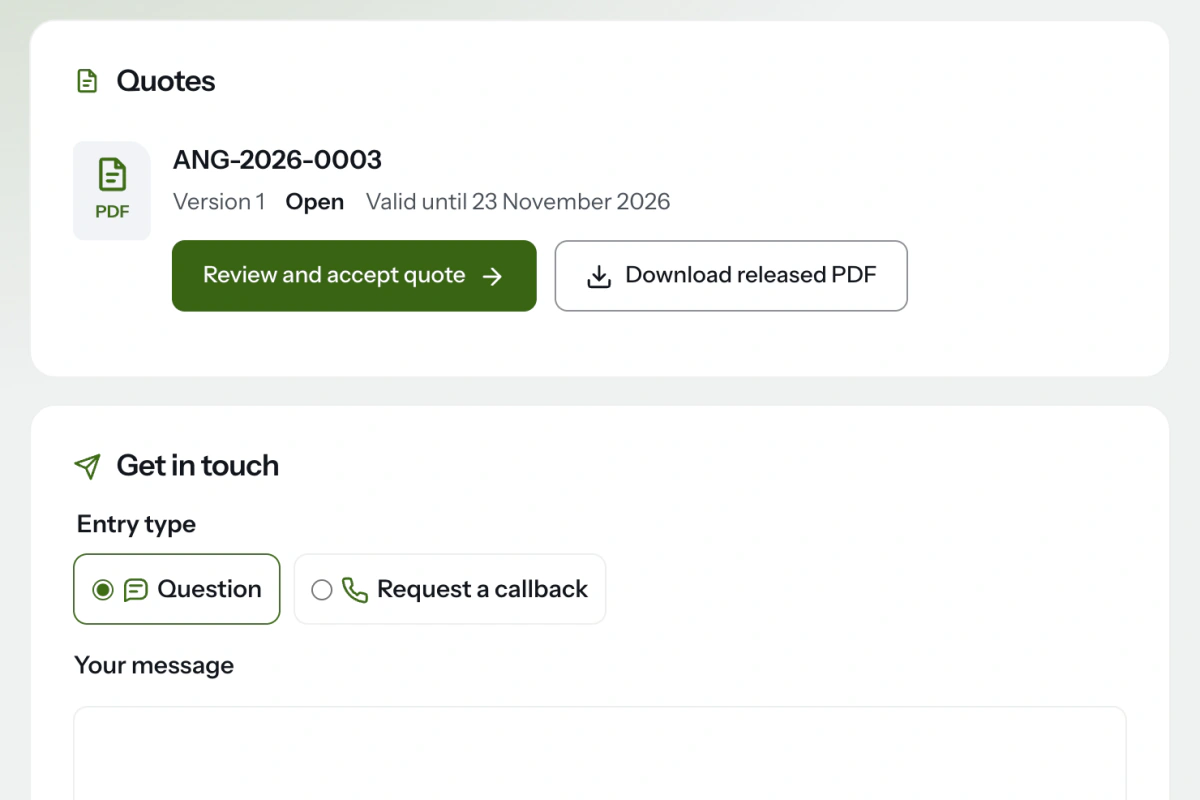
Invite the prospect into their personal Welcome area in your first email. A code sent to the invited inbox gives them access to the quote versions you have shared, their PDFs and the reply form.

They can request a call back or review and accept the quote. The contact history carries over when they become a client.

Personal Welcome area with a shared quote and reply options Enlarge view
newways.suite 1.41.2 · Sample data

Client correspondence

See the finished letter before you send it.

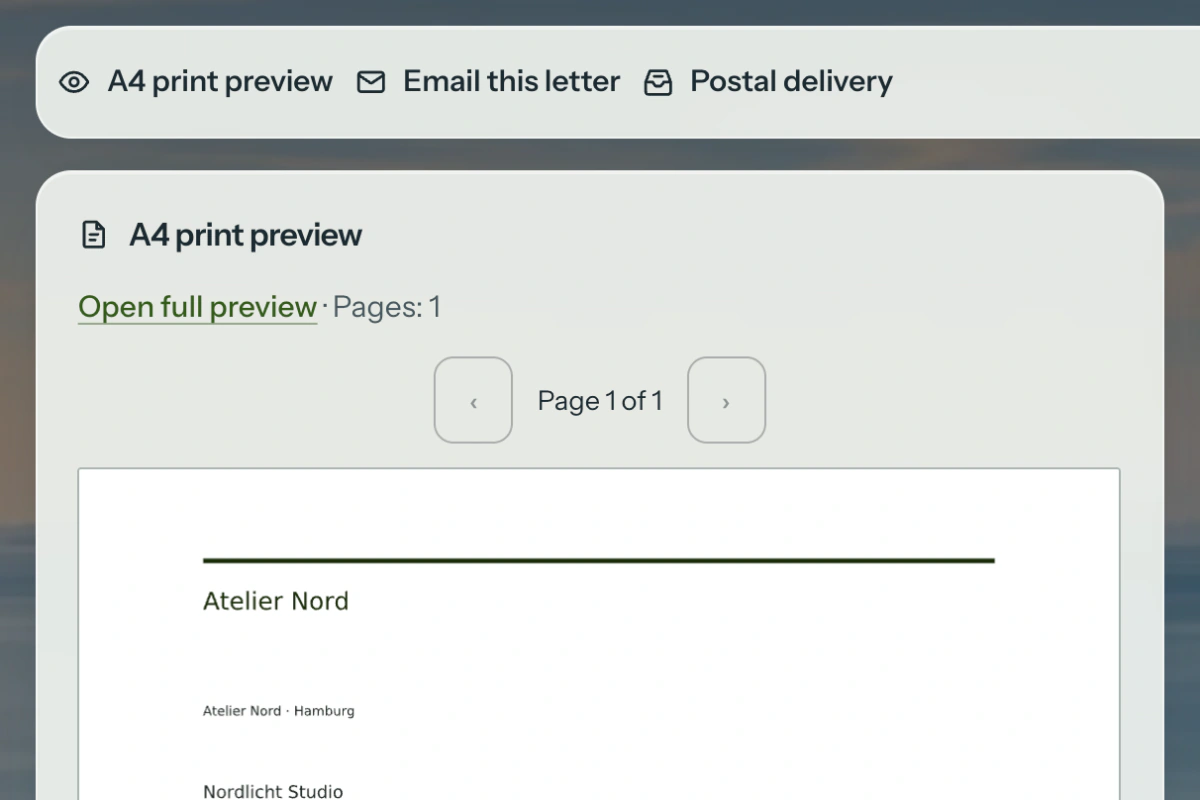
Choose a layout, add your own signature if you wish and check the page breaks in the A4 preview. You can then email the letter as a PDF attachment.

Optional postal delivery via Briefklick uses prepaid credit. The total includes a €0.10 surcharge per letter.

Client letter with an A4 preview and separate delivery options Enlarge view
newways.suite 1.41.2 · Sample data
Calls, email and newsletters

Calls, email and newsletters

A client calls about a quote. Record the next action against their contact, reply from your business mailbox and see whether they have opted in to your newsletter.

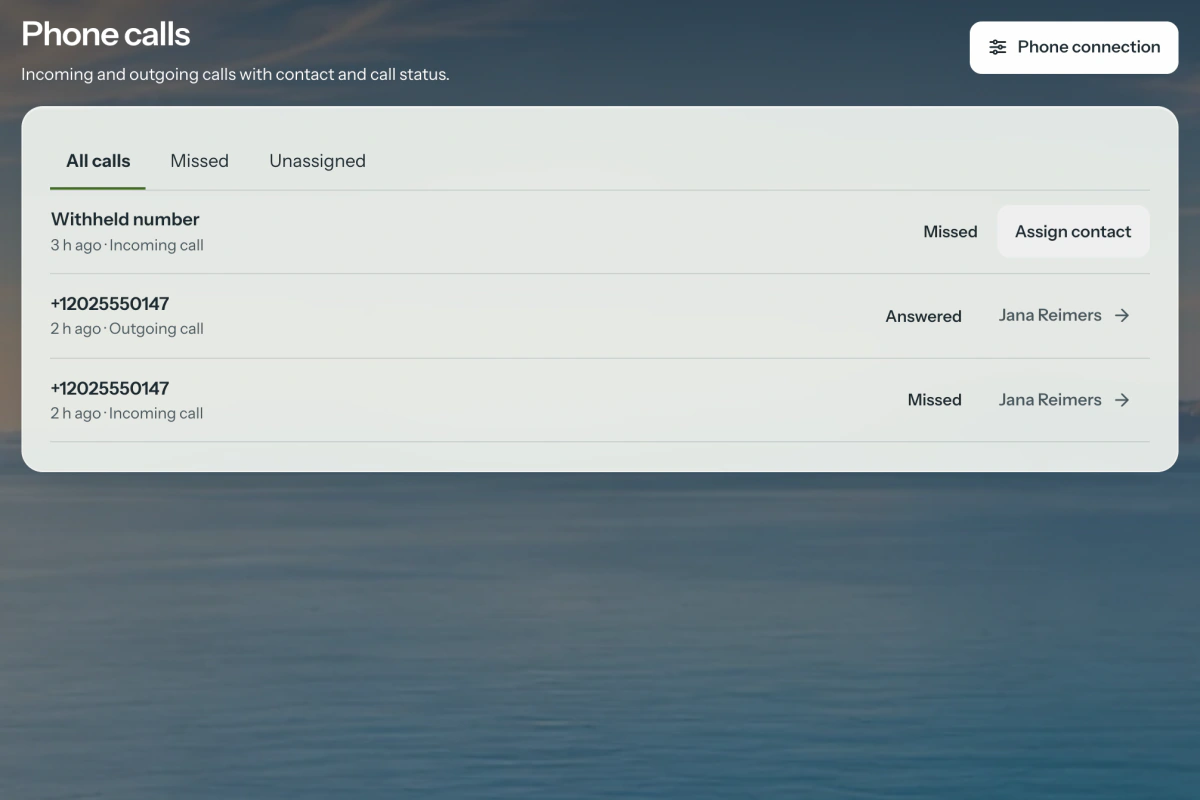
SIP calls

Call from the contact record

Select Call to hand the number to your configured softphone. If your phone system sends call events, the journal also shows missed calls. An unambiguous number can be matched to a contact.

Setup

Starting a call requires a softphone. Call events require a compatible phone system or an adapter.

Phone view with the call journal and contact links Enlarge view
newways.suite 1.41.2 · Sample data
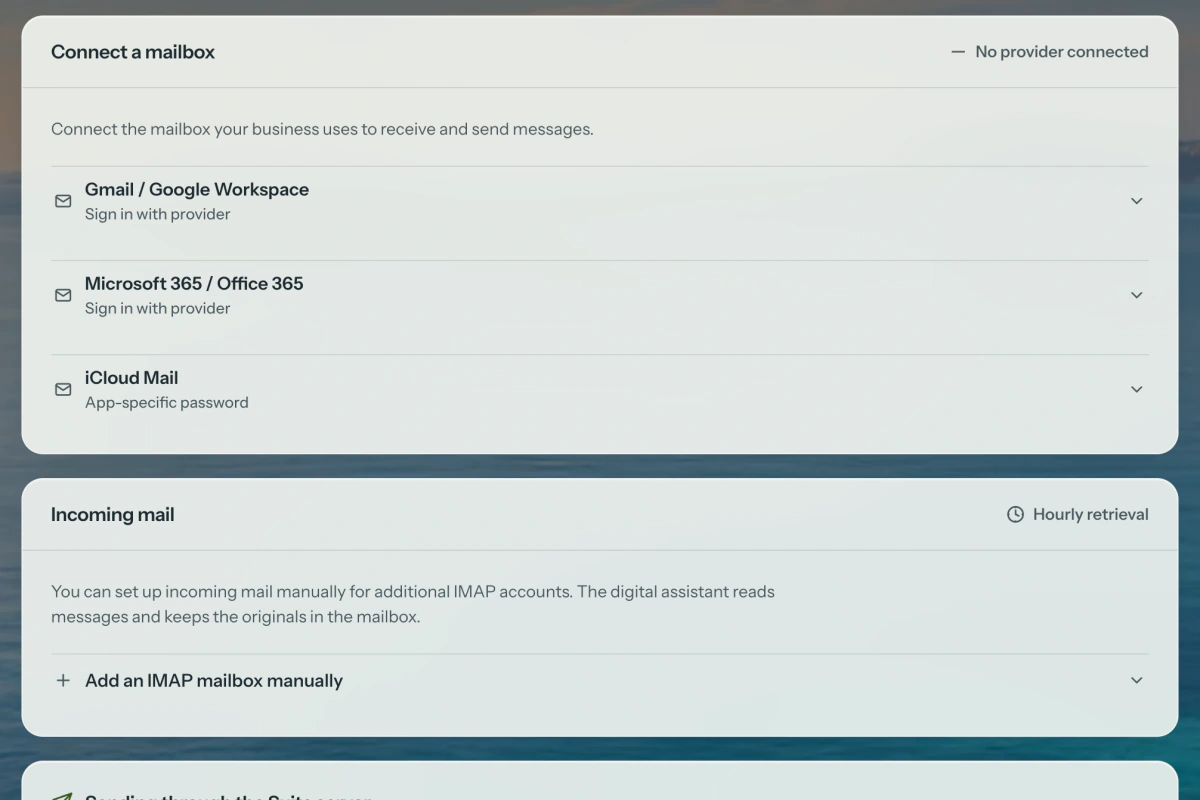
Gmail, Microsoft 365 and iCloud Mail

Connect your business mailbox

Choose a provider and verify the mailbox. The Suite checks incoming mail, outgoing mail and the Sent folder. In the archive, reopen sent messages with the attachments that went out with them.

Setup

Gmail and Microsoft 365 use provider sign-in once configured by the operator. For iCloud Mail, use an app-specific password.

Mail provider options and mailbox setup in the Suite Enlarge view
newways.suite 1.41.2 · Sample data
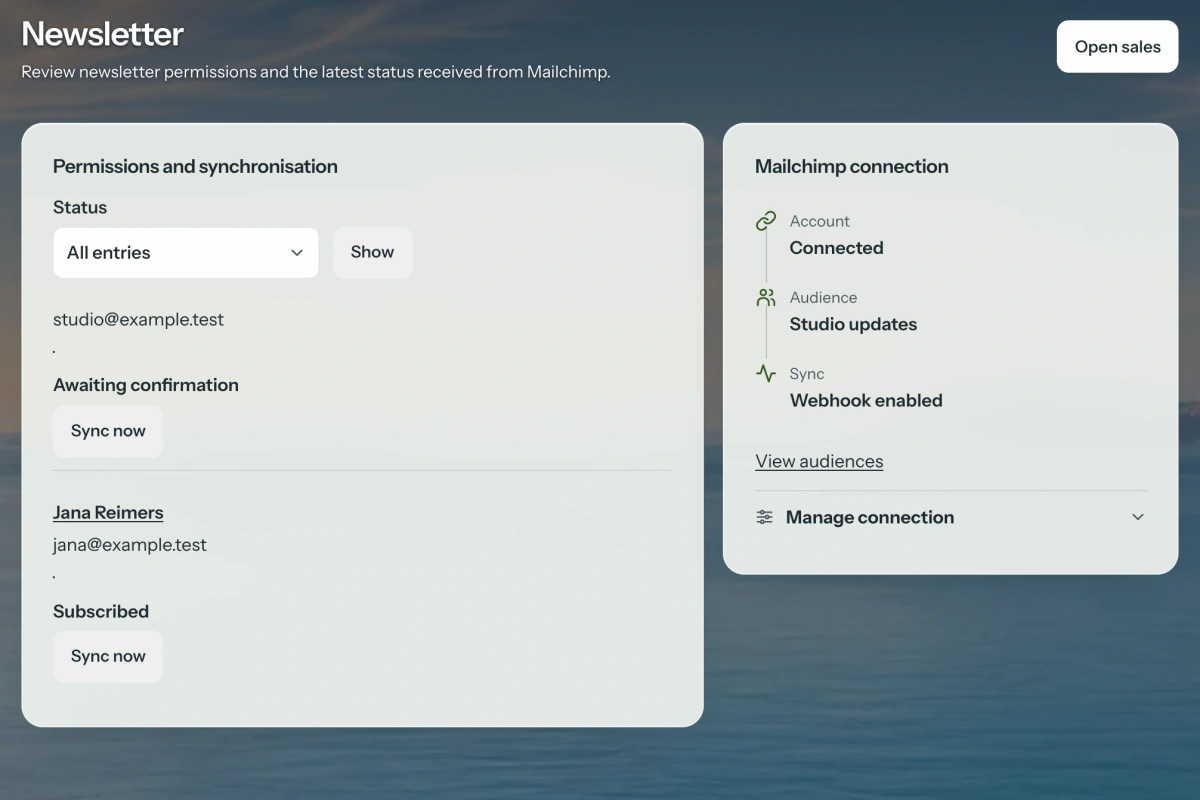
Mailchimp newsletters

Who wants to receive your newsletter?

Record consent against the contact and sync it with the selected Mailchimp audience. Check pending confirmations, unsubscribed addresses and sync attempts that need attention.

Setup

Connect one audience per business. Design, schedule and send campaigns in Mailchimp.

Mailchimp connection, audience and sync status Enlarge view
newways.suite 1.41.2 · Sample data
Request a personal demo

Update 1.39.0

Watch a project take shape

The film for version 1.39.0 follows a first conversation, a personal quote and a client letter. Explore the current product screens in Sales and Communication above.

Explore the product views
German-language film with English subtitles.Open video file
Read the English transcript

How does a conversation turn into a commission? Your contact history brings the idea, the next call and the quote together. Your client opens her personal welcome area, reads the quote and asks her question right there. Once it becomes a project, the team can schedule several tasks at once. That email you sent with the original attachments? One click brings it back. And when you need it on paper, create the letter as a PDF. You can also send it by post from here. newways.suite. For everyone who works on projects.

Open subtitles as a text file

Where would you like to start?

Choose a workspace to see the next step in the suite.

German interface with sample data

How the workspaces connect

Client information together in one record. A quote that becomes an order. And documents linked to the right payments.

Clients, projects and finance stay connected. Your team works with the appropriate access rights, while clients have their own access to the records you share. Estate agents and property businesses can activate the property section.

Follow a job through
14 daysto get to know the suite
From 1 personfor you and your team
DE · EN · ESwork in three languages
Your brandin the client portal too

How your team runs a project

From contact to invoice: explore the connected work areas through real suite screens.

These views show the German interface with sample data. The suite is also available in English and Spanish.

See the context behind every contact

One client.
The full story.

Contacts, emails, documents and projects belong together. Use search and filters to find the right record and pick up your work there.

  • Clients with multiple contacts
  • Assign emails to the right record
  • Keep notes, files and activities together
View 01 · Sample data
Product walkthrough

From overview to quote.

See what needs attention. Find the right document. Check its details and status.

Open workflow video ↗
Working together.
With your brand's look.
One place for your clients

The client portal for project work

Your clients see what you share. And they know when it is their turn to act.

Review quotes, find documents, respond to tasks and follow project progress in a dedicated client area, including on a smartphone.

01

Clear decisions, fewer follow-upsQuotes and decisions in one place, with a clear record.

02

A shared view of the projectTasks, files and information shared with your clients.

03

Your colours. Your identity.The portal carries your brand. Your own domain is available on the Pro plan.

Choose a plan for your team

Basis, Plus or Pro, each starting with one person. Choose the plan that fits your business.

Introductory offer until 31 December 2026: 50% off the regular monthly price for the first twelve paid months after the initial free period. The regular price applies after that.

The first 14 days are free. Your contract starts when you book. Unless you cancel, your chosen subscription continues as a paid plan after that. Payment details are not requested when you book.

To get started

Basis

Connect your day-to-day work.

€9.50per user / month

12 paid months, then €19

Choose Basis
  • Clients, documents, projects and portal
  • 600 documents / year
  • 3 GB storage
  • Property module available to activate
Your brand, your capacity

Pro

More flexibility and your own domain.

€19.50per user / month

12 paid months, then €39

Choose Pro
  • All core features in Plus
  • No annual document limit
  • 100 GB storage
  • Your own domain & priority in the support queue

For businesses and self-employed professionals only; prices exclude applicable VAT. For 1–25 team users, with free client access. Allowances apply per plan, not per user. The offer applies to new online bookings made on or before 31 December 2026 (mainland Spain time) and cannot be combined with the annual discount. Annual billing can be selected on the booking page; Enterprise is excluded from the offer.

All allowances & terms

Specific requirements? Talk to us about Enterprise

Marco Lohmann, newways.consultingMarco Lohmann
Your point of contact
A person you can reach

Your demo with Marco Lohmann

Bring a typical project. In 15 minutes, Marco Lohmann will show how your team can take it from the first enquiry through a quote to invoicing.

Your request opens your email app. A personal demo carries no commitment.

  • Team roles and specific client permissions
  • Data export on every plan
  • Named digital assistant services you can switch off
Request a personal demo

From receipts to your accountant

Keep invoices, expenses and payments in one view. Review your documents, reconcile bank transactions and give your accountant a clearly documented record.

01

Record expenses with the original document

Use approved incoming invoices or upload a PDF or image. Previous supplier documents can suggest how to classify an expense. Review amounts and tax treatment, then approve each new document.

Try it in the suite
Suite 1.39.0 · German interface · Fictional business based in Spain
Country profiles and tax settings

A tax profile that fits your business.

Germany

Tax profiles for German businesses, including the Kleinunternehmer small-business VAT scheme. The method used to determine profit and the timing of VAT are recorded separately. The confirmed effective date determines the defaults for new invoices.

Spain

Tax profiles for autónomos, S.L. and S.A. companies in Spain's standard VAT territory. IVA and any applicable IRPF withholding are reviewed for each document. PDF reports, Excel/CSV lists and original incoming documents are available for your asesoría.

Your business determines the profile. Choose the legal form that matches your business's country of establishment: for example, a sole trader, GmbH or UG in Germany, or an Autónomo, S.L. or S.A. in Spain. Business activity, income tax, bookkeeping and VAT are recorded separately. Profile corrections remain traceable, together with their reasons.

Collaboration

Your accountant can work alongside you.

Invite your contact with the Bookkeeping / Tax adviser role. They can review financial documents, work on expenses, match bank transactions and create reports. Projects, team administration and general settings remain restricted.

Traceability

Corrections stay traceable.

Original documents are preserved. An amended expense receives a new version with a reason; an incorrect payment is reversed. You and your accountant can see what changed.

Bank reconciliation uses imported files; direct bank feeds are not included. The suite prepares documents and does not file tax returns. Discuss special territories, special tax regimes and corrections across financial years separately with your accountant. DATEV requires complete, confirmed account mappings.

Invoicing for Germany and Spain

Your business's country of establishment and confirmed tax profile determine the invoicing workflow. Structured e-invoices are available for Germany; Spain has its own invoicing workflow, with VeriFactu when configured. PDF/A-3b preserves your invoice documents.

Draft quote · German interface with sample data

Germany · E-invoicesThe document and its data belong together.

ZUGFeRD/Factur-X combines your invoice with embedded XML data. XRechnung is available as a separate XML file. Required information, calculation rules and XML structure are checked before export.

The EN 16931, XRechnung and BASIC profiles are available for the German invoicing workflow. Choose the default profile in Settings. A saved Leitweg-ID is taken into account when exporting XRechnung.

Spain · PDF and VeriFactuKeep track of submissions.

Spanish businesses use their own invoicing workflow; ZUGFeRD is not required for it. When VeriFactu is enabled, the invoice and its register entry are created together. Once configured, records are submitted to the AEAT, with responses and pending submissions visible in the suite.

Technical corrections, cancellations and monthly reconciliation complement the register. Test and production environments remain separate.

PDF/A and the issued documentKeep the basis of each invoice.

Invoices and credit notes are generated as PDF/A-3b. When a new document is finalised, the Suite saves the company and customer details, line items and tax groups used for that document.

Later changes to master data do not alter that saved state. An issued-document snapshot is not created retrospectively for older documents; existing original files are preserved.

Incoming e-invoicesFrom incoming invoice to reviewed expense.

Upload structured XML invoices and PDFs with invoice XML, or use an email attachment. Review the supplier, amounts, possible duplicates and project assignment.

Once approved, the document can be used as an expense. The original file and review history are preserved. Plain scans are not read automatically; payments and tax treatment require separate confirmation.

VeriFactu requires the issuer's NIF, a valid certificate and a task scheduled to run every minute. Production also requires the signed manufacturer declaration for the installed software version to be released. Setup is checked in the test environment first.

From property record to listing

Property record · Brochure · Enquirers

The property takes centre stage. Your whole workflow stays connected.

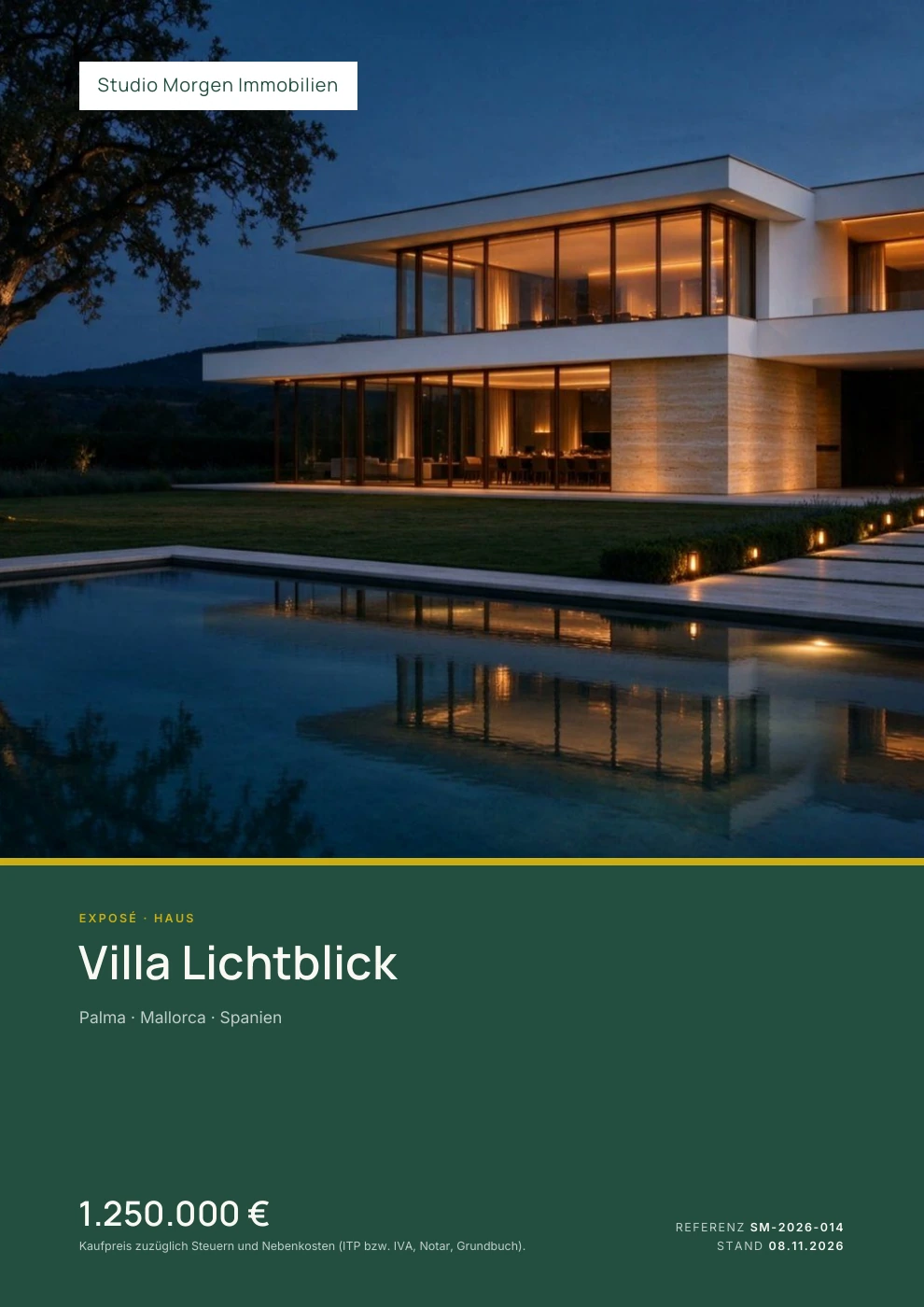
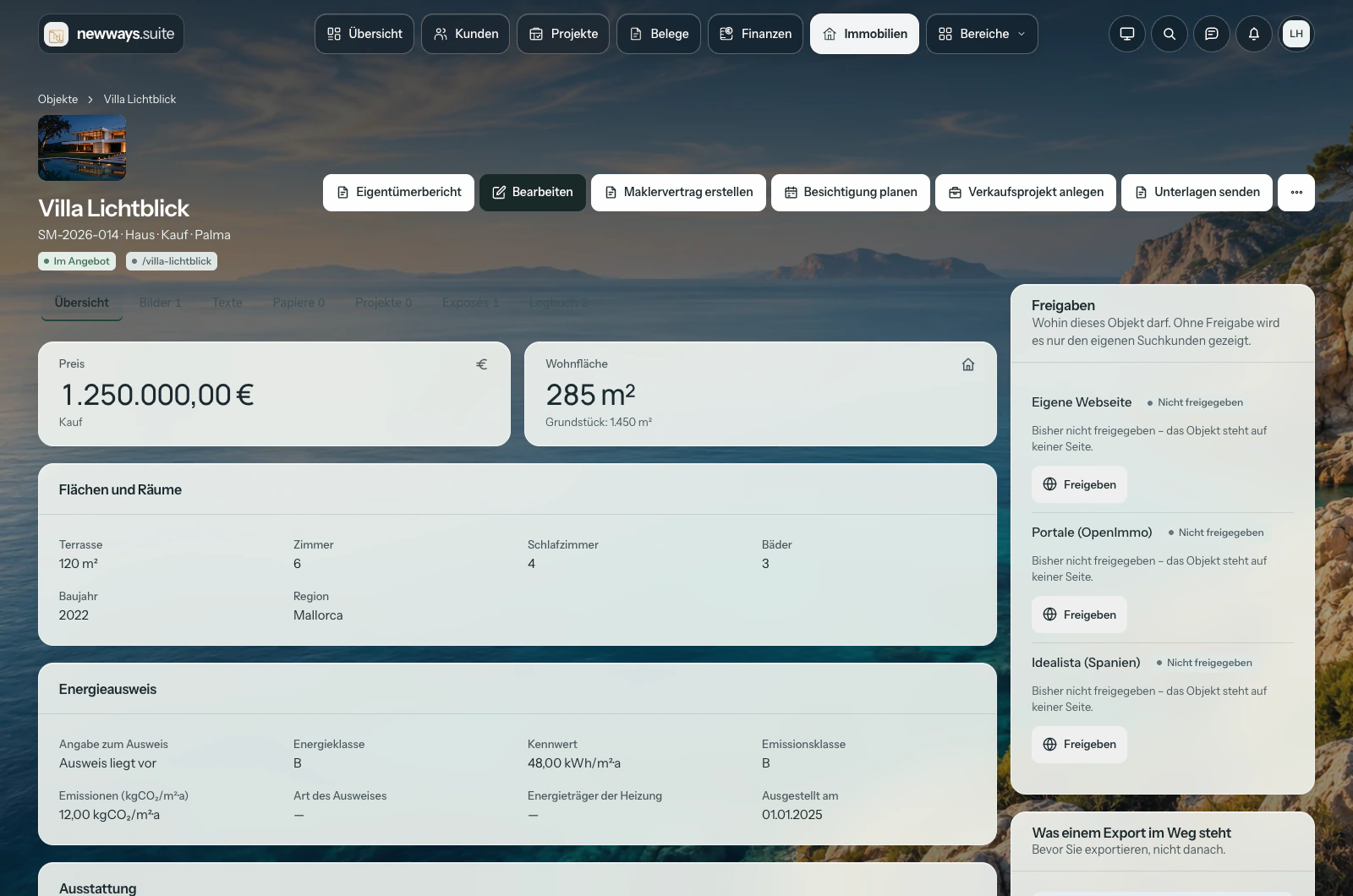
Manage images, key facts and descriptions in the property record. Use them to create a personal online brochure and a PDF. Enquiries, prospective buyers or tenants, and next steps all have their place in the suite.

Explore the property brochures
Make the first impression your own.

One link that brings your property to life.

A personal HTML property brochure for each prospective buyer or tenant, in their browser, on their smartphone and in your company's style.

  • Images and details in one placeA gallery, description, key facts and any floor plans or documents you have shared.
  • In the enquirer's languageUse existing property descriptions in German, English or Spanish.
  • A next step within the brochureAsk a question, request a viewing or download the PDF.

On the Pro plan, you can also use your own activated domain.

Suite 1.39.0 · Fictional sample property in Spain
Product walkthrough

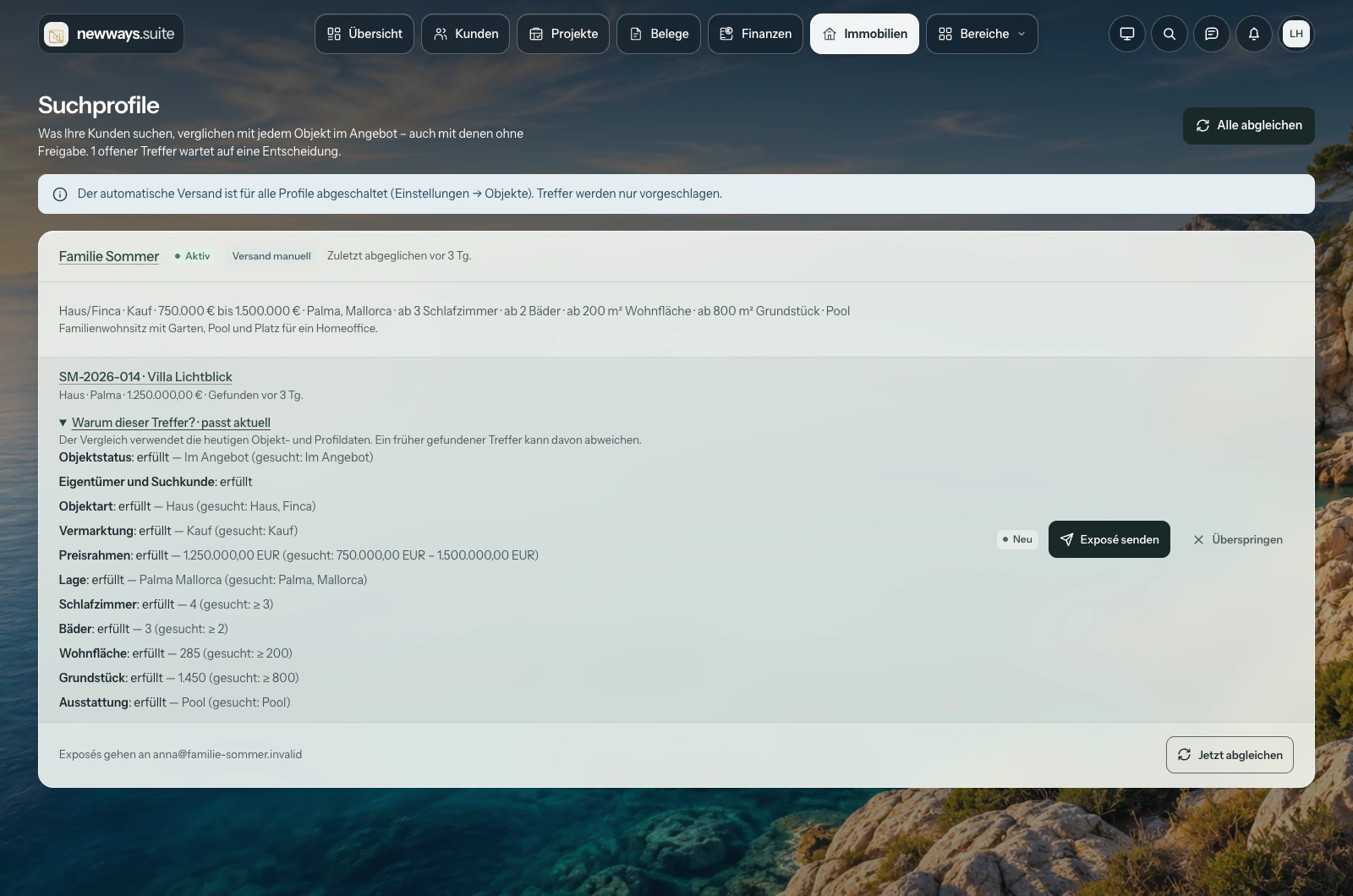
From search criteria to a match.

Compare criteria, understand the suggested match and explore the property.

Open workflow video ↗
Your work is behind every brochure.

The work behind it stays connected too.

The property record keeps information and activities together. After the first enquiry, the work continues in the suite.

01

Enquirers & search profiles

Record requirements, find suitable properties and send each enquirer the relevant brochure.

02

Viewings & owners

Link appointments to the property and show owners the updates you share in the portal.

03

Contracts & collaboration

Use guided templates for agency agreements, prospect registration and cooperation agreements. This contract assistant uses forms and templates.

04

Website & property portals

Choose which properties to share through each channel: your own website, OpenImmo or Idealista, with the appropriate setup and required portal agreement.

One portfolio. Several publishing channels.

Your properties.
Beyond the suite too.

Manage properties in one place and choose which to share with your website or property portals. The format, access and setup depend on the channel.

Compare export formats and transfer methods
Available export and feed options
ChannelFormat & transferHow to use it
OpenImmo / XMLOpenImmo XML in a ZIP package
Transfer via FTP or FTPS
Send approved properties to compatible property portals. Portal access and the appropriate configuration are required.
Your own property websiteJSON feed / configured transferYour website receives the properties and images you have approved for it from the suite.
IdealistaDedicated JSON channelProvide your selected properties after setup and with the appropriate portal agreement.

Transfer runs from the suite to your website or portal. The available retrieval feeds provide JSON; XML transfers use the OpenImmo format.

The property module is included in Basis, Plus and Pro.Activate it to suit your business. Digital assistant allowances and certain additional features depend on your plan and setup.

Request a property demo Property module film (earlier product version)

How the digital assistants can help

Support where the question arises.

An email in the inbox, a question about a project record or an enquiry in a property brochure: each digital assistant has a different role and receives the context intended for it. You remain in control of actions that require confirmation.

A suggestion is still a suggestion.Actions that require confirmation are carried out only after your approval.

Digital assistant analysis sends the content needed for the task to Anthropic; dictation and read-aloud features use ElevenLabs. Both services process content in the USA. You can switch these features off. Their scope and allowances depend on your plan and setup.

For your inboxThe assistant.

It prepares incoming enquiries for the next steps: assigning messages, drafting replies and suggesting tasks, quotes or property brochures.

For example An enquiry becomes a draft quote for you to review, using services from your own catalogue.

You check the client, content and prices. Draft replies are not sent automatically.

For your work in the suiteThe companion.

It supports you directly in the client, document or project record you have open. User guide mode helps with questions about using the suite and provides relevant source references.

For example “What deadline is recorded for this project?”

Suggested changes are reviewed and confirmed before they are applied.

For prospective buyers and tenantsThe property adviser.

It explains the property details entered in the HTML brochure. If someone wants to take their interest further, it can prepare a handover to the contact form.

For example A question about a property's stated floor area or features.

It cannot see internal notes. A viewing request remains a request; the adviser does not confirm an appointment.

For your signed-in clientsThe portal companion.

This optional assistant answers questions in the client portal about the client's own document or shared project currently open. It receives the relevant, designated portion of that record.

For example A question about project information visible in the client's own area.

It provides information and does not change data. Internal content that has not been shared remains inaccessible.

For your property descriptionsThe writing assistant.

Prepare property descriptions from details and keywords, translate text or use selected photos for captions, for your website and brochures in German, English and Spanish.

For example Create a first draft of a description from the property features you have entered.

You review and accept the text. The writing assistant does not publish anything automatically.

Voice support too

Dictate questions and have answers read aloud when the voice service is configured. You choose when recording and playback start.

Step by step to an agency agreement

The contract assistant guides you through forms and editable templates for agency and cooperation agreements. It is a guided template process; you review the details and contract content.

Your workspace in the Suite

Customers, documents and projects are one click away. Individual glass elements with an icon and label form the navigation. Find more features under Areas, including a search.

On desktop: your main work areas float above the background.
On the go: navigation designed for the smaller screen.
01

Straight to the right area.

Clear labels and distinctive icons make the way visible. There is no need to look for customers under a broad category. Your access rights still determine which features appear.

02

Information in context.

Open customers, documents and projects in a side preview. Keep the list alongside it, with your search and filters intact. Open the full record whenever you need it.

03

Your workspace. Your view.

Choose a background, adjust the glass effect and list density, or use the quiet focus mode. Your company colours and logo remain part of your identity.

Your view of the Suite

Nine backgrounds. One personal workspace.

Coast, city or space: choose the atmosphere you enjoy working in. Content stays clearly organised on its own reading surfaces.

Landscapes

Coast
Highlands
Dunes

Cities

Harbour
Skyline
Night city

Space

Earth
Ringed planet
Nebula

A workspace that suits you.

All nine backgrounds are available in the Suite. Focus mode hides the image while keeping your work areas available.

The backgrounds are specially generated illustrations and landscape images. Your selection is saved for your business and user account in this browser.

Original screenshots from Suite 1.39.0 with fictional sample data. The features shown depend on your plan, setup and access rights.

Does the suite fit your working day?Try adding a client, preparing a quote and creating your first document.

Try it for 14 days Compare plans

Find the feature you need

From everyday tasks to your business's particular requirements. Explore the details here, organised by area of work.

Sales & correspondence

From enquiry to delivery

Sales work queue and canvas

Filter follow-ups by owner, open opportunities by stage and log handovers with a next action and due date. Review pipeline totals and recorded changes in the report or a CSV export.

Welcome area

A personal invitation, an email code, shared quote PDFs, questions and call-back requests linked to the contact.

Mail archive

Open original sent messages and attachments, export EML files or review and resend a message. Filing and sending have separate statuses.

Client letters

Choose an A4 layout and optional signature. Email the PDF or use the optional postal service.

Plan tasks together

Change the owner or due date for several open project tasks and briefly undo the change.

Clients & communication

Contacts in context

Clients & contacts

Client records with contact details, multiple contacts, notes and related activities.

Inbox & email

Connect mailboxes, assign messages to clients and projects, and reply from the relevant record.

Search & filters

Find clients, documents and other records. Narrow down lists using the available criteria.

Import & export

Import clients from a spreadsheet and export lists as CSV for further use.

SIP calls and call journal

Open the softphone from a contact. Follow up on missed calls when your phone system sends call events.

Gmail, Microsoft 365 and iCloud Mail

Set up a business mailbox for incoming and outgoing mail and the Sent folder.

Mailchimp newsletters

Sync subscriptions and unsubscribes with one audience. Build and send campaigns in Mailchimp.

Quotes & finance

From service to invoice

Service catalogue & packages

Manage services and packages with your own prices, quantities and units. Quotes created from the catalogue retain their original details even if you change the catalogue later.

Quotes & acceptance

Let clients review quotes via a link and accept them as binding agreements, with an optional signature using a mouse or finger. Acceptance remains recorded on the document.

Invoices & credit notes

Create documents, export them as PDF/A-3b, send them and record payments. Newly finalised documents retain the company and customer details used at the time.

Order confirmations & templates

Create further documents from quotes and reuse proven line items by duplicating them. Order confirmations record what was agreed.

Payment reminders

Track outstanding amounts and trigger payment reminders with a sending record, manually or through configured reminder stages.

Reports & tax advisers

Bring together invoices, expenses and payments for a selected period. A PDF report, Excel/CSV lists and original incoming documents form a traceable handover package for your accountant.

Expenses & your accountant

Connect documents, payments and handover

Expenses with original documents

Use approved incoming invoices or record PDF and image documents. Keep the original, tax review and change history together.

Bank import & reconciliation

Preview and import CSV and camt.053 files. Review suggested invoices or expenses and match the full amount or a partial amount.

Tax profiles for Germany & Spain

Confirm the country, tax regime and effective date. New invoices use the appropriate defaults; invoices already issued remain unchanged.

PDF, Excel & CSV

Select a period and share a documented handover package with a PDF report, XLSX workbook, CSV lists and original incoming documents.

DATEV after account mapping confirmation

Create posting batches with agreed account mappings. Subsequent exports account for postings already handed over and corrections within the same financial year.

Access for your accountant

A dedicated team role opens financial areas for collaborative work. Projects, team administration and general settings remain restricted.

Projects & team

Who does what, by when?

Projects & tasks

Phases, tasks and board views connect your planning with responsibilities, deadlines, progress and budget.

Time tracking

Record time with a timer or manually, assign it to projects and add billable entries to invoices.

Calendar & appointments

Link appointments and invitations to the relevant records. An ICS subscription lets you view the suite calendar in your calendar application too.

Files & client tasks

Store documents and make selected tasks or files available in the client area.

Roles & permissions

Invite team members and grant access according to their roles.

Overview & starter templates

Customise your overview and start with templates for website projects, ongoing support or process consulting. You set your own prices.

Client portal & brand

Working with your clients

Dedicated client area

Share quotes, invoices and approved projects. Clients can comment on tasks, upload files and see what is newly available to them.

Logo, colours & document layouts

Four email signature layouts and four document layouts adapt to your brand. You can also set the logo size for PDF documents. The new Clear and Editorial layouts can use the logo, colours and font pairing from your branding settings. Issued invoice originals remain unchanged.

Your own domain

On the Pro plan, use your own domain for the client area and document and property brochure links, following DNS verification and activation.

Languages & mobile access

German, English and Spanish for core workflows; some administration sections remain in German. Light and dark themes and layouts for small screens.

Digital assistants & automation

Prepare. Review. Confirm.

Inbox assistant

Get help assigning messages, drafting replies and suggesting tasks or quotes. With the appropriate setup, suggestions are ready as soon as mail has been retrieved.

Personal companion

Ask questions about the client, document or project record you have open. For help using the suite, user guide mode finds relevant instructions with source references.

Suggestions for your approval

Review clients, prices and content before applying suggestions. Confirm edited suggestions again. Draft replies are not sent automatically.

Voice support

Dictate questions and have answers read aloud when the voice service is configured. Recording and playback start only when you choose.

From enquiry to draft quote

Review the client, catalogue services and internal follow-up together. The prepared workflow is created only after you confirm.

Answers for your clients

An optional digital assistant in the client portal answers questions about the client's own open document or a shared project. It does not create or change anything there.

Property & agency work

For businesses working with property

Property records

Manage properties with multilingual descriptions, photos, video and documents. A log, reservations and project links keep the history together.

HTML property brochure & property adviser

Personal online property brochures with a gallery, shared documents and contact options. The optional property adviser explains property details and can prepare a handover to the contact form.

PDF property brochure

A designed document created from the property record, with images, key facts, contact details and a QR link to the online brochure.

Search profiles & enquirers

Record requirements, match suitable properties and assign the relevant brochures.

Viewings & owners

Link viewings to properties and show owners the updates you share in the portal. Prepare the commission invoice at the end.

Agency agreements & cooperation

Templates for agency and cooperation agreements, prospect registration and commission-sharing arrangements.

Idealista connection

Provide your approved properties to Idealista as JSON. The appropriate portal agreement and setup are required.

OpenImmo portals

Transfer approved properties to compatible portals as OpenImmo XML. You choose which properties are sent through each channel.

Your property website

Transfer properties and images from the suite to your website through JSON retrieval or a configured transfer. You continue to manage them in the suite.

Module available to activate

The property module is included in all three plans and can be activated when needed.

Setup & support

A good start and help along the way

Guided introduction

Skip setup steps if needed and start with your first client. The next step takes you to the relevant quote or project.

Help, issues & ideas

Send support requests and suggestions directly from the suite and find replies in the conversation history.

Manual & updates

Read about features and follow published improvements in the public changelog.

Personal demo

Explore how the suite could fit your working day in a short conversation with newways.consulting.

Data & integrations

Keep working with your tools

ZUGFeRD/Factur-X & XRechnung

Export PDF/A-3b with embedded invoice data or a separate XRechnung XML file. Read and review incoming XML invoice data.

VeriFactu

After setup, submit billing records to the AEAT, review responses and track technical corrections and monthly reconciliation in the register.

DATEV & tax adviser exports

Export DATEV posting batches after account mapping confirmation, plus PDF and Excel/CSV records for your accountant. Agree on special cases and the first DATEV import with your accounting firm.

Payment links

Let clients pay invoices through a link when a payment service is configured. Manually recorded payments and outstanding amounts also remain visible on the document.

Take your data with you

Export lists as CSV and business data with files as a complete archive on every plan. Login credentials and secret link identifiers are excluded from the archive.

Existing mailboxes

Retrieve mail via IMAP and use your own SMTP outgoing mail service. Configure access and provider terms to suit your business.

Product version 1.41.2, 9 November 2026. Available features depend on your plan, setup and access rights.

Email and postal delivery setup

Sent-folder filing requires a supported IMAP connection. A filing attempt that fails can be checked separately. A4 letters can be used as PDFs. Optional postal delivery requires Briefklick and Stripe to be configured.

The new suite · The film

For everyone who
works on projects.

Ideas need people. Good work needs a clear view. In 63 seconds: digital assistance, projects, a client area and property tools — connected in one workspace.

63 seconds · German audio · DE / EN / ES subtitlesActual suite views with sample data. The generated workplace scenes are staged, not client testimonials.

Architecture. Agencies. Catering. Services.

Where people move projects forward, the suite connects clients, tasks and documents. Work together with a clear next step.

Offer shown in the film: Basis from €9.50 excluding VAT per user per month for the first twelve paid months, then €19. For new subscriptions booked by 31 December 2026. Your contract starts when you book; after 14 days it becomes paid unless you cancel. Applicable VAT is added.

Read the film transcript

Many layers. One clear view. The new newways.suite!

Your digital assistant. Answers and next steps, well prepared. You decide!

Projects, tasks and time. Everything stays connected.

Your clients get their own space. For communication, documents and approvals.

Properties with digital brochures, search profiles and their own property adviser.

newways.suite. For everyone who works on projects.

Start with 14 days free! Then from €9.50 excluding VAT per user per month, for the first twelve paid months. Book by the end of 2026. newways.suite!

Films from the suite

Jump to a walkthrough or browse the film library.

Recorded directly in suite 1.38.0. Choose a chapter or start the video. German interface with fictional business data; explanations follow your selected page language.

Explore all product filmsExplore the features at your own pace.
1:17

The suite in 77 seconds.

A concise overview of the suite and its connected areas of work.

Product film · YouTube
1:22

Assistant, voice, signature.

A look at digital assistance, voice features and quote acceptance.

Product film · YouTube
1:33

The property module – product overview.

A product overview of properties, brochures and enquirers.

Product film · YouTube
1:28

The click.

Clients, property, inbox, portal and projects, all connected.

Product film
1:12

The property module.

Another look at property connections, search profiles and collaboration in the portal.

Product film
1:20

The pen.

A brand film about the thinking behind newways.consulting.

Brand film
2:17

The line continues.

A look at how design, development and consulting connect.

Brand film
1:50

From the first idea.

A visual manifesto about ideas and bringing them to life. Film without sound.

Brand film
0:40

The one dot.

A standalone brand short from the agency's existing campaign.

Brand film
0:40

newways – Cinematic.

A standalone brand short from the agency's existing campaign.

Brand film
Watch the earlier 25-second film
A quick look

The suite in
25 seconds.

One job.
Everything connected.

From client to quote, from project to invoice. See how the suite connects your working day, with property brochures and your digital assistant.

German audio · Subtitles in DE, EN and ES.

Product film showing an earlier interface.
See current workflows directly below.

Films only start when you click. Playing one of the three films labelled YouTube connects to YouTube. The media library contains films from earlier product versions. Some software footage shows older interfaces; the two workflows above show suite 1.38.0.

Before you get started

Who is newways.suite for?

For independent professionals, agencies, service businesses and teams who want to connect clients, quotes, invoices and projects. Businesses working with property can activate the included property module.

Can I use my existing phone system?

You can start calls with a SIP-enabled softphone. To display incoming and missed calls in the journal, your phone system or an adapter needs to send compatible call events to the Suite.

How do I connect my business mailbox?

For Gmail and Microsoft 365, sign in with the provider once provider sign-in has been set up for the Suite. For iCloud Mail, use an app-specific password. The Suite checks incoming mail, outgoing mail and the Sent folder before connecting.

Does every sales contact become a newsletter subscriber?

Record newsletter consent separately in the contact record. Mailchimp asks new addresses to confirm their subscription. An unsubscribe blocks the address in the Suite and syncs with the selected audience.

Which tax systems does the finance area support?

For German businesses, including the Kleinunternehmer small-business VAT scheme, and Spanish autónomos, S.L. and S.A. companies in the standard VAT territory. You confirm the appropriate tax profile and its effective date. The Canary Islands, Ceuta/Melilla, foral tax arrangements and special tax regimes require a separate review with your accountant. The suite does not replace tax advice or submit tax returns.

Can my accountant work directly in the suite?

Yes. With the Bookkeeping / Tax adviser team role, your contact can review financial documents, work on expenses, match bank transactions and create reports. They cannot finalise or send outgoing invoices. The owner confirms the tax profile and export accounts; projects and team administration are restricted for this role.

Does the suite connect directly to my bank?

Bank reconciliation uses CSV or camt.053 files that you download from your bank and import into the suite. Review the preview and confirm the import, then confirm the suggested matches. No bank login details are needed; automatic bank feeds are not included.

Can I explore the suite before booking?

Yes. Before booking, you can request a non-binding 15-minute demo. When you book, your contract starts immediately and the first 14 days are free. If you cancel during that period, you will not receive an invoice. Unless you cancel, your chosen subscription then continues as a paid plan.

How do I cancel?

In your account under “My contract” or in writing. Monthly contracts can be cancelled effective at the end of the current billing period. With annual billing, notice is required at least 30 days before the end of the annual period. During the initial free period, cancellation ends the contract immediately.

Is the offer a permanent discount?

No. For new online bookings made on or before 31 December 2026, the discount applies to the first twelve paid months after the trial period. The regular price of your chosen plan then applies. It cannot be combined with the annual discount.

Do my clients need their own team subscription?

No. Client access is free and does not count towards your team users. Clients see the content you share with them, can comment on tasks and can upload their own files.

Does the suite work on a smartphone?

Yes. The suite runs in the browser and adapts its views to smaller screens. This page shows current screenshots of the mobile overview and client portal.

What do the assistant and companion do automatically?

With the appropriate setup, the inbox assistant can prepare suggestions. You apply suggested actions only after reviewing and approving them; draft replies are not sent automatically. Digital assistant analysis uses Anthropic, while dictation and read-aloud features use ElevenLabs. Both process content in the USA; the features can be switched off.

Does the property module need a separate subscription?

The property module is included in Basis, Plus and Pro and can be activated when needed. External property portals may require separate agreements, access credentials and setup.

Which e-invoice formats does the Suite support?

The invoice workflow follows the business establishment and confirmed tax profile, not the language or customer country. German businesses can use ZUGFeRD/Factur-X with PDF/A-3b and XRechnung, with exemptions such as small businesses taken into account. Spanish businesses use PDF and configured VeriFactu; ZUGFeRD is not required, including with IRPF withholding. Explicit XML requests are validated separately against their profile. Incoming CII, UBL and hybrid PDFs can be read. No Peppol connection.

What do I need for VeriFactu?

Setup requires the issuer's NIF, a valid certificate and its password. Automatic submission also needs a task scheduled to run every minute. After checks in the test environment, production can be used once the signed manufacturer declaration for this software version has been released. The manufacturer declaration is issued by the manufacturer; it is not AEAT certification.

Published manufacturer declarations

Which languages is the suite available in?

Team members choose German, English or Spanish in their profile. The document editor and view, customer assistant, VeriFactu overview and signature designer are translated. Some administration sections and existing custom texts remain in German or their original language. Public booking and this website are available in all three languages. Product screenshots identify their language and version.

Where can I find the privacy policy and contract terms?

You can find the current legal information at newways.consulting and in the suite's booking process. The terms that apply to your booking are also shown there.
Try the Suite on your next project.

Start your 14 days now Or meet us for a personal demo
Clients · Documents · Projects · Portal · PropertyBack to top ↑

Open image at full size

Suite film

Film from the media library: software footage may show an earlier product version. See current workflows in the “Suite in motion” section of this page.